For CPA Firms

Complete more condominium and strata audits without growing your headcount. Condo Audit Pro is purpose-built condominium and strata audit software: it automates the repetitive preparation — document intake, extraction, GL comparison, sampling, invoice checking, and output assembly — while your CPAs keep every professional judgment and every signature.

Book a CPA Demo →See Pricing

More Capacity, Same Team

The preparation work that used to take your staff days per file is done before the CPA sits down. Your team reviews exceptions, follows up, and supports the CPA — not re-keying spreadsheets.

Full Professional Control

AI is advisory only — it never concludes, signs, approves, selects samples, sends questions, or closes a file. Every judgment and every sign-off stays with the licensed CPA.

One Complete Condominium Audit Record

Every upload, check, flag, question, decision, and output for every engagement — retained in full, year over year, ready for any future practice review.

How Your Team Works Today — and With the Platform

A typical small condominium audit takes about 20 hours of preparation in Excel workbooks and desktop audit templates. Here is where those hours go, stage by stage, and what they become on the platform: about 5 in total (our estimate).

Junior staff9 h → 1.5 h
Senior staff7 h → 2 h
CPA4 h → 1.5 h
The same senior4× the audits

Overview

Every engagement and its status, worked out from the file itself.

Today
0.3 h
With CAP
0.1 h

Set up the file

Engagement, acceptance, independence and the building’s facts — from documents, not retyping.

Today
2.0 h
With CAP
0.8 h

Plan the audit

Planning papers pre-filled from the client, the documents and last year.

Today
3.0 h
With CAP
0.9 h

Get documents in

One client portal with named slots; every file checked on arrival.

Today
1.5 h
With CAP
0.3 h

Data from the engine

Records read and reconciled, the ledger matched, adjustments proposed, funds pre-filled.

Today
5.6 h
With CAP
0.9 h

Classify & plan testing

Accounts classified and mapped once, remembered by your firm; controls pre-filled.

Today
2.4 h
With CAP
0.5 h

Do the testing

A sample on your rules, invoices matched, every journal scanned, every owner’s fees tested.

Today
3.0 h
With CAP
0.5 h

Assemble & judge

Leadsheets pre-filled with evidence; the facts every document needs.

Today
1.5 h
With CAP
0.4 h

Review & decide

Findings, questions, reviews, the opinion, eleven documents and the close.

Today
1.9 h
With CAP
0.5 h

See every one of the 47 screens, today and with the platform, on How it works.

What the Platform Handles vs. What the CPA Decides

The platform prepares the file. Every judgment stays with the licensed CPA.

Prepared by the platform

Document reading and extraction, bank statement parsing, GL comparison and trial balance, sample preparation using your firm’s rules, invoice checking, flag creation, question drafts, working papers, and output assembly.

Decided by the CPA

Materiality judgment, sample approval, flag resolution, client-question approval, audit conclusion, report signing, and file close. Only the CPA can close — the platform enforces that separation.

The Engines Inside Every Condominium & Strata Audit

Condo Audit Pro is not document storage with a logo. It is a set of purpose-built audit engines that turn verified client records into structured, tested audit data — each one configured by your firm, and each one stopping where the CPA’s judgment begins.

GL Comparison

Ledger lines are compared to bank and source records using your firm’s tolerances for amount, date, and reference. The CPA reviews exceptions — not every line.

Invoice ↔ GL Testing

Every sampled invoice is checked against the books for amount, date, vendor, classification, and cutoff. Differences surface as exceptions for the CPA.

Revenue Grid

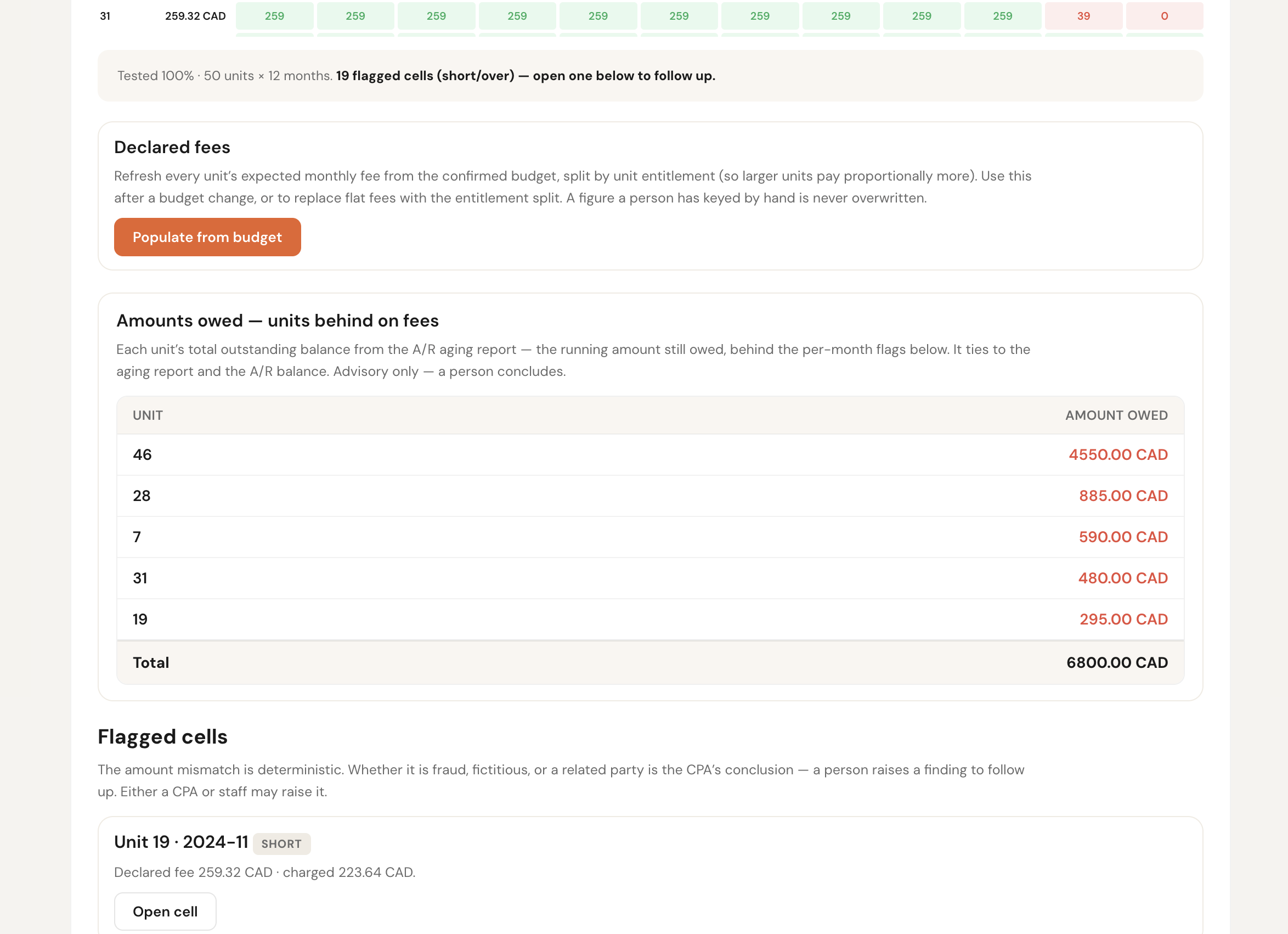
Owner fee revenue is tested for every unit, every month — up to 1,200 unit-month checks on a 100-unit corporation. Coverage a manual sample can’t match.

Trial Balance Engine

Built from the confirmed ledger, footed to the dollar, tied to prior-year closing balances, and versioned — the same approved figures feed every working paper and statement.

Materiality Engine

Calculated from your firm’s own basis and percentages — overall, performance, and clearly-trivial. The platform computes the numbers; the CPA judges significance.

Sampling Engine

Testing selections are prepared by your firm’s configured rules — reproducible, never decided by AI — and every selected item shows why it was chosen.

Journal-Entry Testing

The full journal-entry population is screened against visible risk indicators — round-dollar, period-end, missing references. The software finds the unusual; the CPA decides what needs work.

Fund & Reserve Accounting

Operating and reserve funds with contributions, transfers, interest, and expenditures — continuity reconciled to the trial balance, in each province’s own terms.

Account Mapping Memory

Classify an odd account once and save it as a firm rule — visible, editable, and traceable — so it’s recognized automatically on every future audit.

Confirmations (CAS 505)

Bank, investment, and receivable confirmations tracked from sent to returned in one register — with differences and alternate procedures recorded.

Prior-Year Comparatives

Last year’s statements are read straight into this year’s comparative columns — proposed for the CPA to confirm, edit, or reject.

Close Gates

The file cannot close until reviews are complete, questions are answered, and sign-offs are in place — and only a CPA can close, enforced by the system itself.
Three Rules, Enforced by the System Itself

1. Deterministic first. AI advisory. Human concludes.

Every important calculation uses fixed, explainable rules — the same inputs always give the same answer. AI only reads documents and drafts suggestions. There is no field in the database where an AI conclusion could even be stored.

2. A machine never overwrites a human.

Automation fills in blanks only. If a person typed or confirmed a value, re-running any process can never replace it. The human’s word stands until a human changes it.

3. It remembers your decisions. It doesn’t train on your audits.

When the second audit runs faster, it’s because your firm’s earlier decisions were saved as visible, editable rules you can open, change, or delete. No AI model is trained on client data, and nothing learned is hidden.

See the Software for Yourself

A few real screens from the platform — from the start gate through to close, this is what your team actually works with on every condominium and strata audit.

Revenue Grid — 100% of owner fees tested, every unit × every month, to the cent. Coverage a manual audit can’t match.

Revenue Grid — 100% of owner fees tested, every unit × every month, to the cent. Coverage a manual audit can’t match.

Configured to How Your Firm Audits

Province templates set the legal and reporting structure. Firm settings sit on top — materiality, sampling rules, variance thresholds, cutoff windows, matching tolerances, and management-fee benchmarks — applied consistently while professional judgment stays with the CPA.

Materiality & Sampling

Set your firm’s materiality approach and sampling rules once. The platform applies them consistently across every engagement.

Variance & Tolerance

Budget variance thresholds, GL matching tolerances, and cutoff windows are all configurable to match your firm’s audit approach.

Province-Specific Outputs

Alberta, British Columbia, and Ontario each get their own financial statement wording, letters, and board-ready packages.

The Factors That Make Condominium Audits Complex

Every factor that adds time to a condominium or strata audit is handled inside the platform — so the preparation is done before the CPA sits down.

Investment / bond holdings

Surfaced and tracked through the investments and capital-asset checks, ready for the CPA to review.

Multiple bank accounts

Every bank and reserve account is read, compared to the GL, and reconciled in one place.

Large unit count

Unit schedules, fee calculations, and the revenue grid handle hundreds of units without extra work.

Management company changeover

Mid-year changeovers are handled with split-period processing and comparative flags.

Townhome / apartment split

Separate fund columns for townhome and apartment classes, with combined totals on one set of statements.

Loan to / from owners

Related-party balances are flagged and tracked against the appropriate disclosure requirements.

Reserve fund studies / depreciation reports

Reserve study dates, balances, and contribution comparisons are built into the checks.

What You Keep

At 100 audits a year, preparation the usual way takes about 2,500–4,000 staff hours — one and a half to two and a half full-time staff. With the platform, about 625–1,000: under half of one senior’s year, freeing roughly $110,000–$180,000 of staff time (our estimate, at typical Canadian audit salaries). On the Professional plan the platform costs $300 per audit at full volume, a flat fee that never changes with a building’s size. The rest of what you charge stays with your firm.

See All Plans →

Your Clients and Your Data Stay With Your Firm

We never contact, market to or refer your clients. Your engagement data is isolated to your firm by the database itself, is never shared with another firm, and is never used to train public AI models. Your finished reports and working papers are yours to export at any time.

One Partner Firm in Each Province

In each of Alberta, British Columbia and Ontario, one CPA firm leads the condominium and strata audit practice on the platform. Contact us to learn more.

About the partnership

See it on a real condominium audit file.

Book a demo and we’ll walk your firm through a condominium audit end to end.

Book a CPA Demo →